Video editor
Send your footage. Get a finished reel.
Editing one reel takes hours. Upload your video and say what you want. The editor cuts it, adds captions, sound and scenes, and picks a cover. You see the exact price before it starts.
- From ₹1,200$13
- an edit, no subscription needed
- About 30 min
- you can close the page
- One round
- of changes in every edit
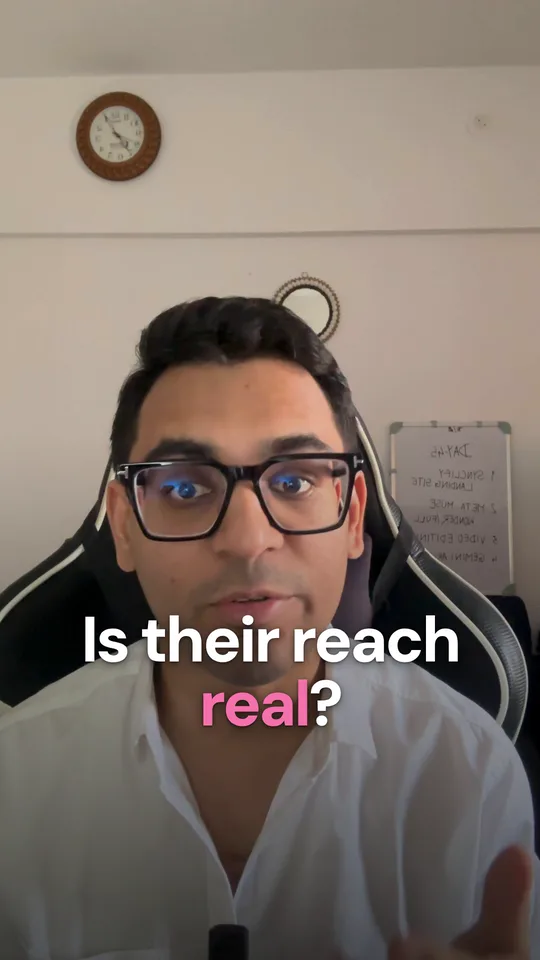
Is their reach real?Made by the Video editor from one take
Watch it being edited
From one phone take to a reel you would post.
A real edit made by the Video editor from the take shown. Scroll, or tap a step.Tap a step to see it.
Pauses and a restart found
How it works
Four steps from a raw clip to a reel you can post.
Step 1 of 4
- IMG_5042.MOVMain video, 41 seconds
- logo.pngLogo
- beat.mp3Music
Real edits
Made by the editor, start to finish.
The first was made by the Video editor itself, from one phone take. The other two were cut from a live stream by the same editor. Tap one to watch it, with sound if you like.
A talking head
Is their reach real?
From: One 56 second phone take
Made start to finish by the Video editor. It cut a restart and the long pauses, built a creator profile, a WhatsApp chat and a real versus bought chart, and chose the cover by his face.
A live stream clip
Better than Fable 5
From: One minute of a long live stream
It cut the moment out of the stream, kept the real screen under the camera and zoomed onto each row of the benchmark as he reads it out.
A live stream clip
Google is back in the picture
From: Another minute of the same stream
It opened on the launch post itself, ran the board of model scores under the camera and ended on a full sentence, never mid word.
Captions
Pick a caption style, or let the editor choose.
Eight styles, placed so they never cover your face. After the edit you can switch the style, move them or fix a word yourself, free.
Shown live on a raw phone clip.
Fix it yourself
Small fixes take seconds, and they are free.
Change a word in the captions, add a sticker or your logo, cut a pause, set the music or trim the ending. You see every change on the video as you make it, then export a new version.
 Your reach is fake
Timeline
A 1.4 second pause at 0:21.
The cover
Choose your cover and see it before you post.
The editor picks the moments where your face looks best, with and without a short title. Tap one and see it in your grid, the feed and the Reels tab. Any other moment or title, change it yourself.
Tap a moment to stop the tour.
 Is their reach real?Is their reach real?Is their reach real?
Bigger changes
Send big changes back. Post knowing it is right.
Changes go to the exact moment
Pin a note to a second in the video, like cut this part at 0:12. One round of changes is included in every edit, and you can ask about any version.
Checked before you post
Every version is watched the way Instagram will, and you get a short list of anything to fix before it goes out.
At 0:08 the captions sit under the Like button.
Move them up a little, or switch to the top position in the editor.
It learns
See how each edit did. The next one learns from it.
When an edit goes live, Synclify links the post to the edit and tracks its reach, views, saves and shares. With a plan, the editor reads what worked before your next edit. Remove anything you do not want it to use.
Is their reach real?
Version 1, posted 3 days ago
Reach
0
2.3x your usual
Views
0
Saves
0
Shares
0
What the editor remembers
Example numbers, to show the layout.
No subscription needed
Edit on a free account, or bring your own key.
Sign up free, buy video credits and edit. With a plan you can also schedule finished edits to Instagram and keep them for good. On a free account they are kept for 90 days.
Use your own Anthropic key
Your Anthropic account pays for the AI, and an edit then costs 15 to 60 video credits by length. Starter includes 1 such edit a month, Growth 3 and Scale 5.
You add the key in Settings and it is tested at once. It is kept encrypted and never sent in a chat.
Edit on your own AI
Use your own Claude. Post through Synclify.
If you use Claude Code, your own Claude can make the edit on your computer with Synclify's editing kit, your account file and its checks. It costs the same as an edit with your own key.
Works with Claude Code
- 1. Connect Synclify to Claude CodeIn Synclify, open Settings and connect Claude. It takes a minute.
- 2. Ask it to edit your videoOpen Claude Code in the folder with your footage and say what you want. The first time, it sets up Synclify's editing kit, which takes 5 to 15 minutes.
- 3. Say yes to the priceClaude shows Synclify's price before anything is spent, then edits on your computer with your account file and Synclify's checks. Your footage stays there.
- 4. It lands in SynclifyThe finished video is checked and waits in Synclify. Change the captions, text, stickers, cuts, sound, cover or trim yourself, ask Claude for changes, then schedule it.
- Up to 30 seconds15₹150$2
- Up to 45 seconds20₹200$3
- Up to 1 minute25₹250$3
- Up to 90 seconds35₹350$4
- Up to 2 minutes45₹450$5
- Up to 3 minutes60₹600$7
Free edits each month: Starter 1, Growth 3 and Scale 5, shared with edits on your own key. One round of changes is included, and each round after it costs a quarter of the edit.
- Mac, Windows (Intel or AMD) or Linux, with about 5 GB free
- Your footage stays on your computer
- Free accounts can use it with video credits
The editing uses your Claude plan's usage. The kit renders with Remotion, which is free for individuals and companies with up to 3 employees; a company with 4 or more needs a Remotion Company License.
Prices
One price for the finished length.
Edits are paid with video credits, bought in packs that last 12 months. If an edit fails on our side, every credit comes back.
- 120 video credits₹1,200 + GST$13
- 240 video credits₹2,280 + GST$24
- 600 video credits₹5,400 + GST$57
- Up to 30 seconds120₹1,200$13
- Up to 45 seconds160₹1,600$17
- Up to 1 minute200₹2,000$21
- Up to 90 seconds280₹2,800$30
- Up to 2 minutes360₹3,600$38
- Up to 3 minutes520₹5,200$55
Shorter edits pay the 30 seconds price. One round of changes is included. Footage over 10 minutes and extra rounds cost a little more, and you see it before you start.
What can the Video editor make?
Finished vertical reels, and square or 16:9 versions, from your own footage: talking heads, product demos, podcast clips, b-roll cuts and tutorials, with captions in eight styles, sound, music and a cover. It handles Hindi and Hinglish captions.
Can it make a video without my face or without footage?
Yes. With no video at all it designs every scene from your idea, photos, logo, screenshots or a web page link, and a voiceover you upload can carry the story. Choose New edit, write what you want, and add whatever you have.
What will it not do?
It does not make an AI voice, so narration needs a voiceover you record and upload. It does not animate characters or cartoons, and it never fakes real footage, numbers or reviews.
How does an edit work?
Upload your files, say what you want, answer up to four quick questions and see the exact price before anything is spent. The editor works for 25 to 40 minutes while you can close the page, then you get version 1 with a note on what it did. One round of changes is included, and small changes you make yourself are free: captions and text, stickers, cutting a sentence or a pause, the sound, a trim or the cover.
How much does an edit cost?
An edit is priced by its finished length: 120 video credits up to 30 seconds (₹1,200), 200 for a minute and 520 for 3 minutes. One round of changes is included, another costs a quarter of the edit, at least 30 video credits, and footage over 10 minutes adds 10. Packs are 120, 240 and 600 video credits, no subscription needed. A Studio clip is 25 video credits.
Why did my edit fail?
When an edit fails on our side every credit comes back on its own, and the edit says why. Cancelling before it starts also returns everything, but cancelling after it starts does not.
How long are my files kept?
Your footage is deleted 30 days after the edit last changed. Finished videos stay while you subscribe, and for 90 days on a free account, with reminders before.
Can I use the Video editor on my iPhone?
Yes, in the latest iPhone app it is under More, called Video editor, and you can buy video credits there through Apple. If you do not see it yet, open synclify.ai in Safari and sign in. On Android, use your phone's browser.
How do I use my own Anthropic key?
Your own Anthropic account can pay for the AI in your edits. Sign up on the Claude Console, then add credit, then set a monthly limit, then create and copy a key, then paste it in Synclify, and it is tested at once. Plans include free edits with your own key (Starter 1, Growth 3, Scale 5 a month), then each one is 15 to 60 video credits by length, with one round of changes included and a quarter of that for each round after. Never send a key in a chat.
Can I edit with my own Claude?
Yes. Connect Synclify to Claude Code on your computer and say edit this video: your own Claude does the editing with Synclify's kit, account file and checks, and the finished video lands in Synclify ready to schedule. It costs the same as an edit with your own key, 15 to 60 video credits by length or one of your plan's free own-key edits, and your footage stays on your computer. Claude chat on the web or phone cannot edit footage, so it has to be Claude Code.
What does Synclify get from my computer?
Your footage stays on your computer. Synclify receives the finished video, its cover, a small file describing it, the files that let you change the captions, text, stickers, cuts, sound, cover and trim in Synclify, and a short summary of the edit (hook type, length, caption style and pace). It gets the speech audio only when you choose Synclify's transcript, and a support file of logs and versions only when you report a problem.
Do I need a licence for the editing kit?
The kit is licensed to your Synclify account for edits started through Synclify. It renders with Remotion, which is free for individuals and for companies with up to 3 employees. A company with 4 or more needs its own Remotion Company License from remotion.dev.
Connect your account and ask your first question.
It takes two minutes. Your first answer comes from your own posts.
Cancel any time. Every dashboard and report is free to open.