What an AI assistant actually does for an Instagram account
A chat window writes text. An assistant can post, schedule, reply and invoice on a real account, which is a different thing and only safe under one condition: you see what it is about to do before it does it.

In this piece
- 01 What a chat window is genuinely good at
- 02 It has never seen a single one of your posts
- 03 What it means for software to act on your account
- 04 Anything that can act has to ask first
- 05 Some jobs need an undo, some need a tap
- 06 What a tool like this should refuse to do
- 07 Where we come in, and where we do not
- 08 Questions people ask about this
You have probably already tried this. You asked a chat window for a caption, it gave you five, one of them was nearly usable, and every claim you have read about AI since has landed on slightly harder ground. That is a fair place to be standing, and it is worth being precise about why.
The window did the job it can do. What it cannot do is anything that requires knowing your account, and it cannot do anything at all: it hands you text and the work of using the text stays with you. Those two limits are what people mean when they say assistant, and the second one is where the interesting question lives.
What a chat window is genuinely good at
It is a first draft machine, and a first draft machine is worth having. The expensive part of writing a caption is the empty box. Something on the page, even something wrong, is easier to fix than nothing is to start, and a model will produce ten openings in the time it takes to make tea.
It is also good at shape work. Shorten this. Say it without the exclamation marks. Turn this paragraph into six lines of on-screen text. Give me the same idea for somebody who has never heard of me. None of that needs to know anything about you, and all of it is the tedious part of writing.

It has never seen a single one of your posts
This is the part that gets skipped in every demo. A chat window has read an enormous amount of writing about Instagram, most of it produced by people selling advice about Instagram. When you ask what to post on Thursday, that is the pool the answer comes out of. It has no access to your posts, your saves, your reach, your calendar, or the four subjects you actually cover.
| What you ask | A general chat window | What the answer actually requires |
|---|---|---|
| Write a caption about a morning routine | Genuinely fine. It has read a million of them | Nothing. Ask away |
| Give me ten hook options for this reel | Fine, and fast | Nothing, though it will not know which kind has worked for you |
| What should I post on Thursday? | A guess wearing the clothes of advice | Your subjects, your calendar, and what you posted last week |
| Why did my reach drop last week? | The three generic reasons, confidently | Your last fortnight, post by post, against your normal |
| What time should I post? | An hour chart built from somebody else's audience | Your own posting history, by day and by hour |
| Which of my posts got saved the most? | It cannot know | Saves per post, which only your account holds |
| Is 4.7% engagement good for me? | A published band for that follower size, which is something | Your own history, and which direction it moved |
| Who owes me money? | It cannot know | Your invoices and their due dates |
The top two rows are why people keep using chat windows. The bottom six are why they stop being impressed.
What it means for software to act on your account
An assistant, in the sense worth caring about, is software you have connected to your account, so that asking for something and getting it are the same step. Concretely, that is five kinds of verb.
- Read. Pull your posts, your reach, your saves, your follower history, your comments, so that an answer about your account is computed from your account.
- Draft. Write a caption, a hook, a script, a reply, a brief, and put it somewhere you can find it again rather than in a chat log you will scroll past.
- Schedule. Put a specific post in the calendar for a specific minute, and then publish it when that minute arrives, whether or not you are awake.
- Reply. Post a public comment under your handle, or send a DM that a real person receives from you.
- Invoice. Raise a bill, email it to a client, chase it when it goes late, record the payment when it lands.
The first two are mild. The last three are the ones that change the nature of the software, because they leave the building. A scheduled post reaches everyone who follows you. A comment reply is read as you saying it. An invoice arrives in a client's inbox with your name on it and cannot be recalled.
In February 2024 the British Columbia Civil Resolution Tribunal ordered Air Canada to pay C$812.02 to a passenger after the chatbot on the airline's own website described a refund policy the airline did not have. The airline argued the chatbot was a separate entity and the tribunal rejected it. That case is a small one, and it settles a question that matters here: what the software said, the company said.
Anything that can act has to ask first
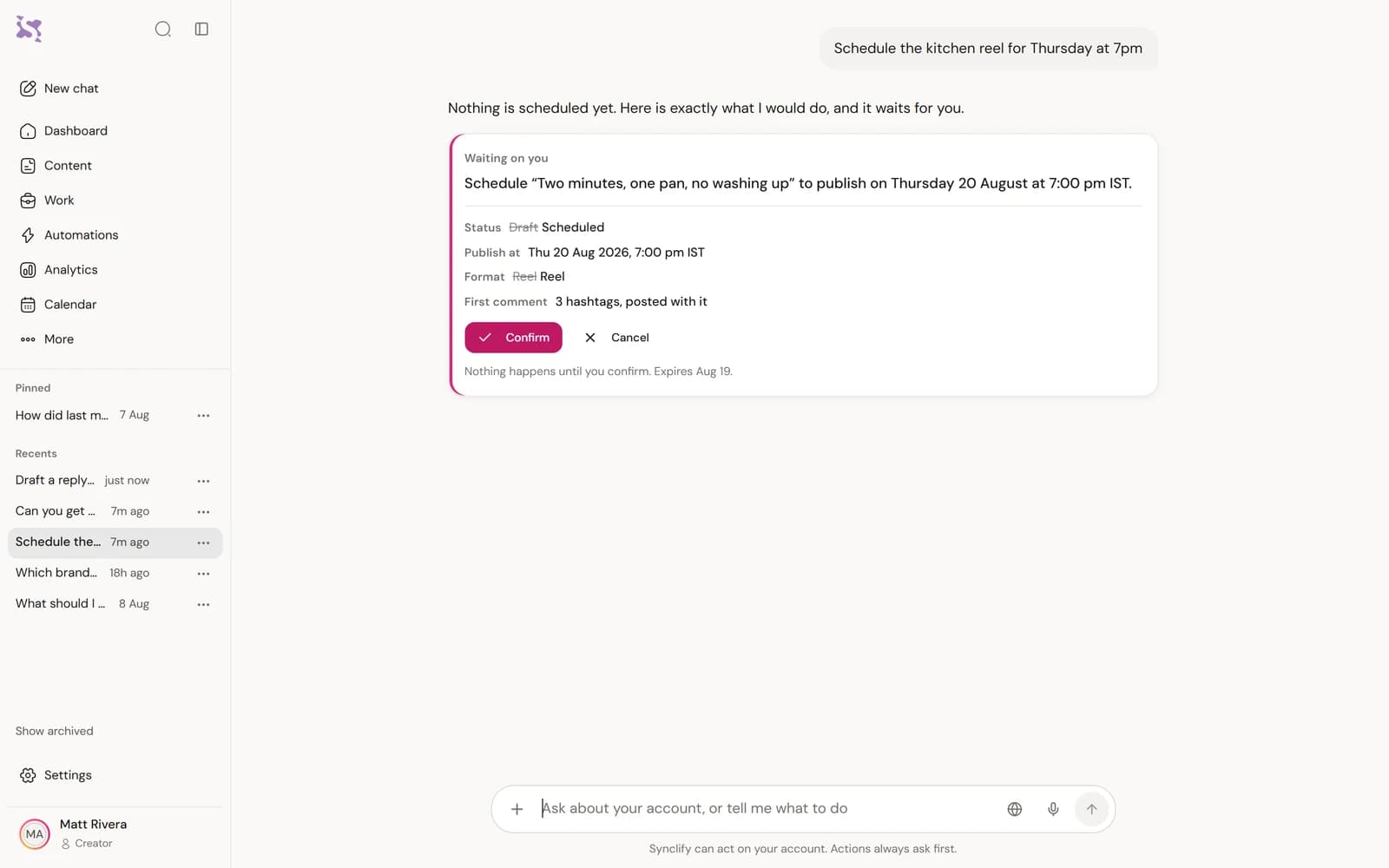
Here is the whole argument in one screen. Suppose Maya, who runs a lifestyle account in Mumbai, types a sentence into her assistant: [schedule the kitchen reel](/use-cases/instagram-content-calendar) for Thursday at 7pm. Nothing is scheduled. What appears is a card.
| The line on the card | Why that line is on it |
|---|---|
| Post: How I organise a tiny kitchen (Reel) | There are two kitchen reels in her drafts. She needs to see which one this is |
| Caption: the first three lines, as they will appear | The caption is the thing most often wrong, and it is invisible in a summary that says "schedule a reel" |
| Account: @maya.everyday | Anybody managing a second account has posted to the wrong one at least once |
| When: Thursday, 7:00pm, Asia/Kolkata | The timezone is written out because a scheduling mistake is almost always a timezone mistake |
| Why then: her measured best hour for reels on a Thursday | It says where the suggestion came from, so she can disagree with the reasoning rather than only the outcome |
| Two buttons: schedule it, or cancel | One tap either way, and no default that runs if she ignores it |
If she taps cancel, the conversation records a line saying it was cancelled and nothing was executed. That line sounds like a small courtesy and it answers the second most common question anybody asks their own tools, which is whether the thing actually went out.
Notice what the card is doing. It is turning a sentence you typed in ordinary English into a specific, checkable proposal, and putting the decision back in your hands at the point where you have enough information to make it. A model that got the wrong reel is harmless here. A model that got the wrong reel with no card is a post going out on Thursday evening to everyone who follows you.
How we know: publishing, scheduling, sending an invoice, replying to a comment and switching on an automation all wait for your confirmation.
Some jobs need an undo, some need a tap
Asking permission for everything is its own failure. A person who taps yes forty times a day is not reading the fortieth card, and a gate everybody clicks through has stopped being a gate. So the useful design sorts actions by what happens when one is wrong.
- It only looks, so it runs free. Reading your top posts, your reach, your invoices, your calendar. A read that was wrong costs you the ten seconds it takes to ask again. Interrupting for permission here would train you to stop reading the interruptions.
- It writes something reversible, so it runs with an undo. Drafts, notes, a calendar entry that publishes nothing, a corrected label on an old post. Nothing has left the building, so the safe design is to do it and offer to put it back. Real reversal, from a snapshot of what was there before, and it refuses if the thing has moved on since.
- Somebody else will see it, so it waits for a tap. Publishing, scheduling, replying to a comment, sending an invoice or a contract, switching an automation on, assigning work to a person. Scheduling belongs here because scheduling is publishing with a delay, and nobody should learn a post went out by seeing it.
How we know: a confirmation you have not answered expires after 24 hours, with one tap to suggest it again.
What a tool like this should refuse to do
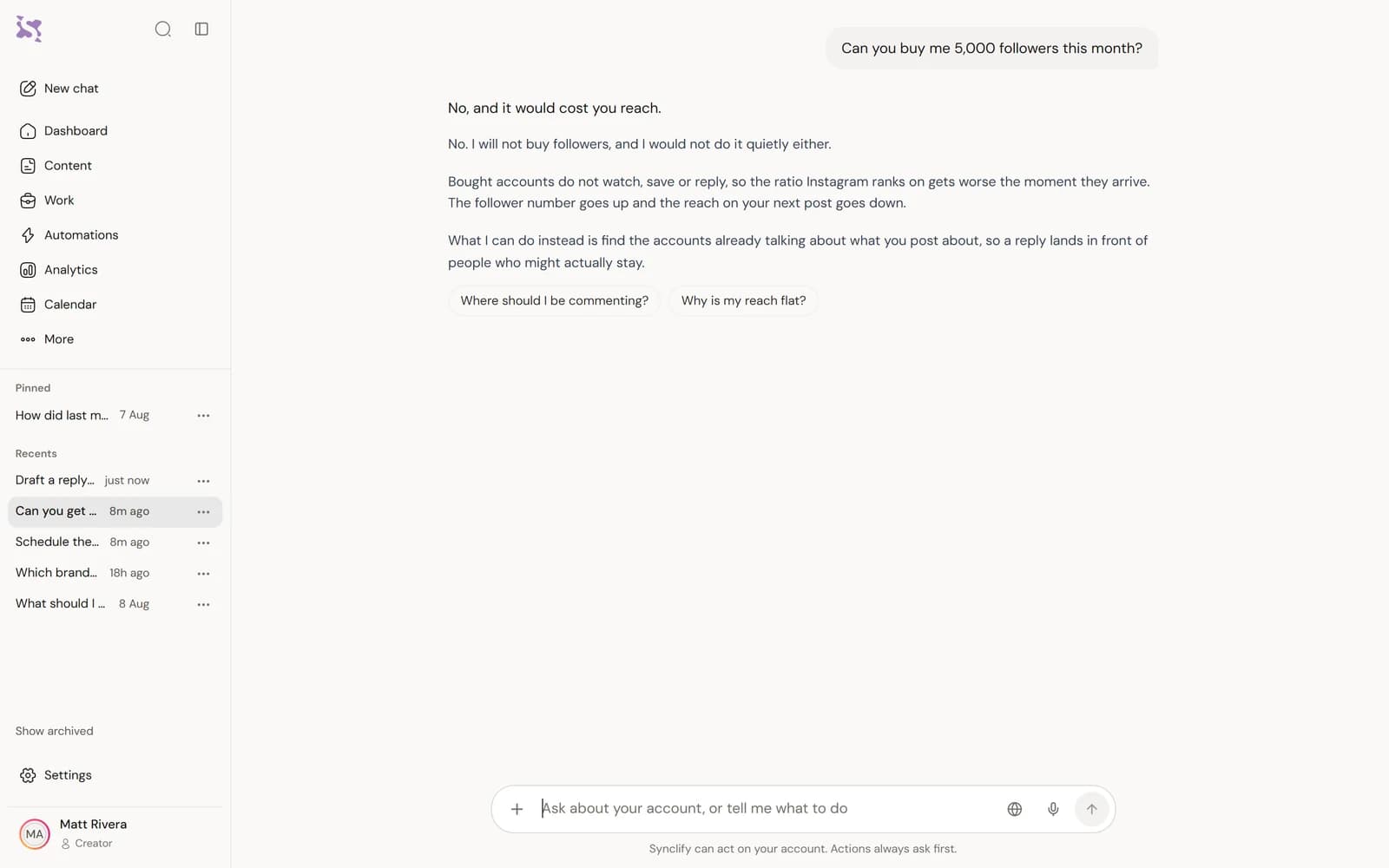
The refusals are more informative than the features. Anything that can post can also be built to post a great deal, and the decisions somebody made about where to stop tell you what they think they are selling.
- Send messages in bulk. Not capped, not throttled, absent. If a tool can DM a thousand people it will eventually be used to, and the account carrying the consequence is yours.
- State a number it did not compute. When a figure cannot be worked out from real data the honest answer is that it cannot be worked out. An estimate presented as a measurement is the worst output an analytics tool can produce, because you will act on it.
- Guess a competitor's private numbers. Instagram does not expose anybody else's saves, shares or reach. A tool showing you a rival's engagement rate is showing you arithmetic on public numbers at best.
- Act on instructions that arrived in your data. Captions, comments and uploaded briefs are text written by other people. Text should never be able to instruct the software that reads it.
- Approve anything from a voice command. Speech gets misheard. A misheard read is a wasted question, and a misheard publish is a published post.
- Change your security settings. Two-factor and passkeys belong in settings, behind you, and nowhere near a conversation.
You can run those six against anything, including us. The list below is the version to actually use, because most of these questions have answers you can find before you connect an account rather than after.
Where we come in, and where we do not
This is the product section, and it is one section because everything above holds whether or not you ever use ours. Synclify is an Instagram assistant built on exactly the design described here: you ask in plain words, it reads your own account before answering, and anything that leaves the building shows you a card first.
The tool list runs to 408 entries, from reading your reach to raising an invoice, and one of them is a writer with 24 formats: caption, hook, script, carousel, first comment, DM reply, and the rest. Every tool carries a risk level, and the three levels are the three above. It also speaks first occasionally, on 32 subjects it watches, of which these five are the ones you meet most: an invoice that is properly late, a post running away from your own baseline, comments turning negative, a deadline arriving with nothing to publish, and something due today. Four gates stand between one of those and your phone, including your own quiet hours in your own timezone.
How we know: every action has a recorded risk level, and a test fails if an action is added or removed without one.
A share of it happens while you are asleep, which is the part of any assistant worth paying for and also the part that most needs a boundary. A schedule of jobs runs behind you: your posts and numbers resync, the queue publishes what you already approved, overdue invoices get found. Anything you ask for that a person will see still waits for the same card you would have got if you were sitting there.
How we know: every scheduled job is declared in one file, including an hourly full sync and a once-a-day check that flags overdue invoices.
Questions people ask about this
Is this really different from asking ChatGPT for my captions?
For writing a caption from scratch, less than you would think. For anything involving your own numbers, completely: a chat window cannot read your saves, your reach or your calendar, so it answers about Instagram in general and you supply the specifics by hand. The other difference is that it hands you text and stops. Nothing gets scheduled, nothing gets sent, nothing gets chased.
What if I approve something and then change my mind?
For a scheduled post, you cancel it in the queue before it goes, the same as any scheduler. For anything already published or already emailed, no software can help you: it is out. That asymmetry is the reason those actions confirm and drafts do not.
Can it post without me being there?
It can publish a post you already approved, at the time you approved, which is what scheduling is. It cannot decide to publish something. If you set up a recurring instruction like a Monday summary, that runs read-only, because a confirmation card works by having a person there to answer it and at 7am on a Monday nobody is.
How do I know a figure it shows me is real?
Ask where it came from and over what period, and expect a specific answer. Any tool that will not tell you the window a number covers is not a tool you can check, and a figure you cannot check is a figure you should not put in a media kit.
- Pew Research Center, "ChatGPT use among Americans roughly doubled since 2023", June 2025 34% of US adults said they had used ChatGPT, and 58% of adults under 30. Survey of 5,123 US adults, fielded 24 February to 2 March 2025
- Moffatt v. Air Canada, British Columbia Civil Resolution Tribunal, February 2024 Air Canada was ordered to pay C$812.02 in total after its website chatbot misdescribed the airline's bereavement fare policy. The tribunal rejected the argument that the chatbot was a separate entity
How we checked this
- The list of actions that wait for confirmation.
- How long an unanswered confirmation lasts.
- The test that gives every action a recorded risk level.
- The product's list of scheduled jobs.


You have read how it works. Now watch it read yours.
Connect your Instagram and ask it one question. It reads the account first, so the first answer is about your posts rather than about Instagram in general.
Cancel any time. Every dashboard and report is free to open.